← All software
Applications
Gmail Outlook Synch
Keep your Outlook and Gmail calendars and contacts in sync automatically, straight from your Windows PC. Choose the direction per type (one-way, two-way, or off) and an optional calendar date range — no cloud service, your data stays yours.
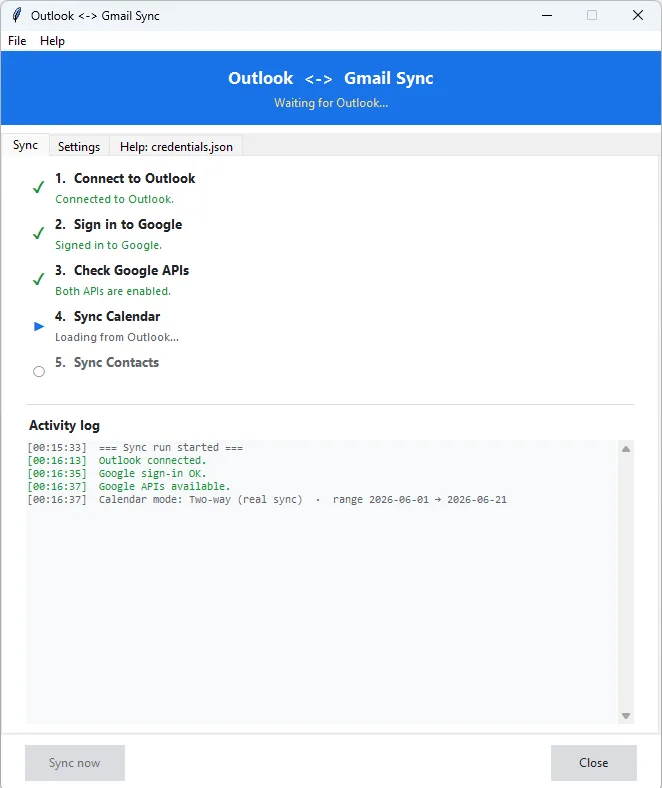
Outlook ↔ Gmail Sync is a Windows desktop tool that keeps your calendar and contacts in step between the Outlook desktop app and your Gmail/Google account. It runs on your own PC, talks directly to Outlook and to Google, and shows a clear step-by-step screen (connect to Outlook → sign in to Google → check APIs → sync calendar → sync contacts). For each type you choose the direction — Outlook → Gmail, Gmail → Outlook, two-way, or no action — and for the calendar you can limit syncing to a date range. When the same item changed on both sides, the most recently edited version wins. It can run on demand from its window or unattended on a schedule, and there's a single-file .exe.
Is this for you? This tool is a good fit if you live in the Outlook desktop client but also need your appointments and contacts mirrored into Google (or the other way around), and you want that to happen automatically without paying for a cloud sync service or handing your data to a third party — everything stays between your PC, your Outlook, and your own Google account. The one-way and "no action" options make it flexible: you can, for example, push only contacts one direction and leave the calendar alone. It's practical for someone juggling a work Outlook and a personal Gmail, or migrating gradually from one to the other.
It's probably not the right tool if you don't use the Outlook desktop app (it needs Outlook installed and running on Windows — it does not work with Outlook.com in a browser or on Mac), if you need email, recurring-event series, or contact photos synced (those aren't handled), or if you're not comfortable doing a one-time Google setup (creating a credentials.json in the Google Cloud Console). If those constraints are fine, it will quietly save you the manual copy-paste of keeping two calendars and address books aligned.
Nederlands
Get the download link
Enter your e-mail address and we'll send you a download link. The link can be used up to 2 times.